You play the top. Secondo plays the rest — and shows you which is which.
Plug in whatever you own. Secondo takes the MIDI, adds the bass, the harmony, the second hand and the drums, sends each part to its own Audio Unit, and paints the whole result on a live 76-key keyboard so you can see it happen.
76
keys on screen
E1–G7
range
99.71%
notes on a key
any
MIDI controller

Four things you can read off it without looking away from your hands.
It is a live keyboard, not a piano roll. Nothing scrolls, nothing is recorded, nothing is edited — it shows what is sounding, right now.
Which notes are yours
Solid keys are the ones your fingers pressed. Dimmer, dashed keys under the same colour are what the tricks added — the doubled root, the mirrored voicing, the strum. At a glance you know whether the app is doing what you asked.
How hard you played
Velocity drives the intensity of the light, from a barely-there 12 to a saturated 122. You can see your own dynamics on the way past.
What the chord is
Colour comes from pitch class, so the same chord shape is the same colour wherever you voice it on the board. The top bar reads the key, the chord and the melody note alongside it.
When something ran away
A stale note cannot sit lit through a set — every key carries a 30-second guard — and Panic clears the whole board and every hanging note in the rig at once.
Where it sits in the window.
The keyboard occupies the instrument position of the performance surface, under the vocal panel and above the trick bar. It is the default view on a fresh install.
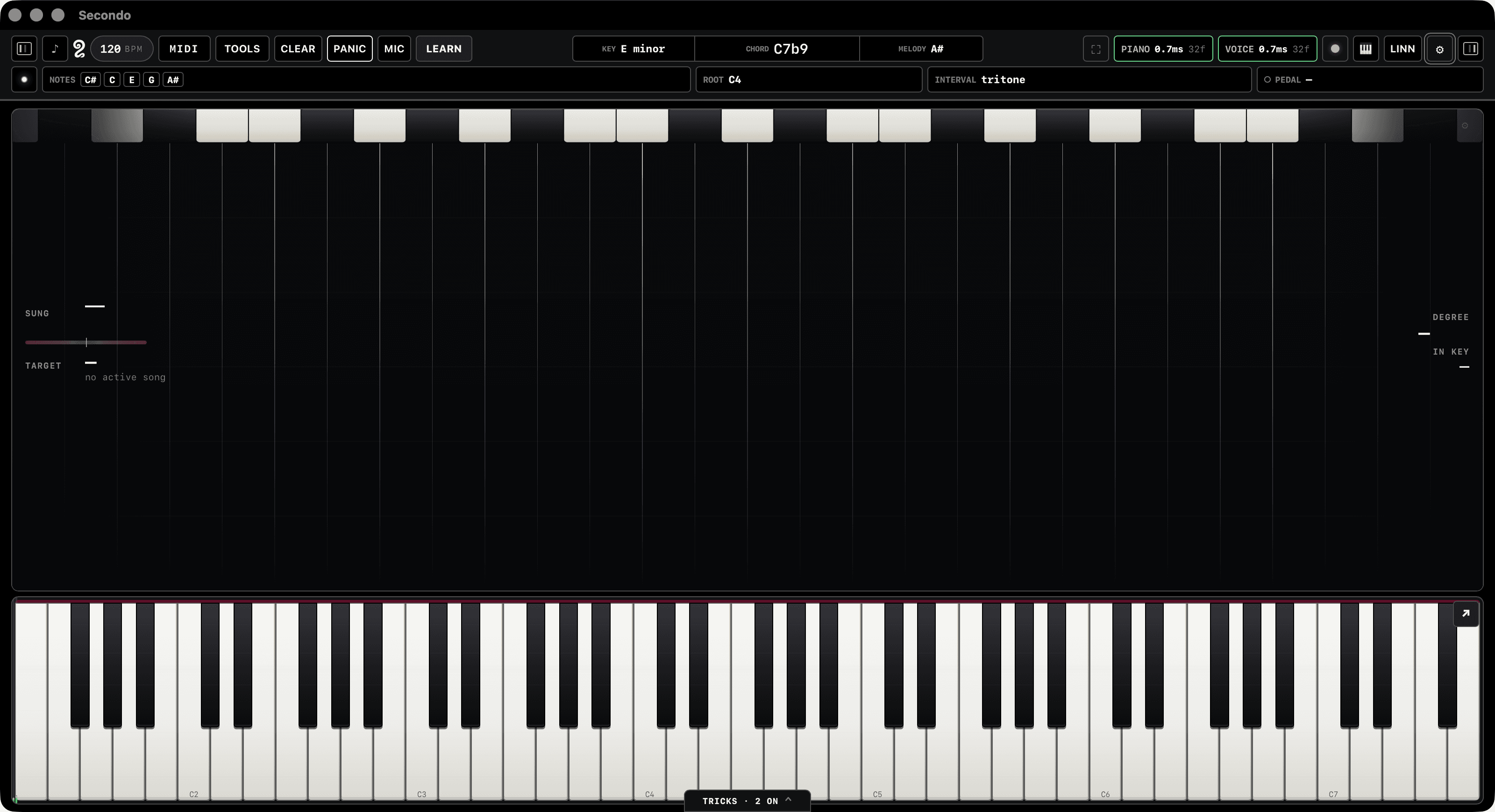
The range was chosen against 15,592 note-ons of real material rather than picked by eye. E1–G7 puts 99.71% of them on a key; the 0.29% that fall outside are counted in an overflow marker instead of vanishing. It is also the exact span of a 76-key stage keyboard, and it fully contains everything a LinnStrument can emit — so nothing any supported instrument can play is invisible.
You play the top. Secondo plays the rest.
The tricks are not effects bolted on after the fact. They sit in the MIDI path and add parts from what your hands are already doing.
The bass
Takes the root of the chord you're holding, drops it an octave or two, and sends it to its own instrument.
The harmony
Adds the intervals you choose to the line you're playing — optionally only to the top note, so the melody harmonizes and the chord underneath stays clean.
The other hand
Re-voices a chord you play with one hand wherever you need it, so the other hand is free to do something else.
The drums
Sixteen pads, each bound to a key and a MIDI trigger, firing a note, a chord or a whole drum pattern quantised to the set tempo.
Nine things that happen between the key and the sound.
All nine live in the Rust engine, save with the song, and can be thrown mid-phrase by a foot pedal, a pad, or a button on the controller itself.
Hand Split
Split the keybed by pitch or by hardware zone. Each side gets its own instrument, octave and transpose — and the side is decided from the note you actually played, so a shift can never throw a note across the split.
Auto Sustain
Sustain that follows the music instead of your foot. Secondo hears the chord change and clears the last one, with a cooldown so it doesn't flap mid-arpeggio.
Sustain Retrigger
A note you nominate drives the sustain on a timer you set — the kick-pedal sustain hack, built into the engine instead of bolted on.
Chord Mirror
Re-voice a chord at any interval, from either hand.
Auto Harmonize
Harmony intervals in real time, optionally top note only.
Octave Doubling
Double up or down, one to three octaves.
Root Doubling
The chord root, dropped, on its own safe channel.
Strum
Spread a held chord — speed, direction, velocity-driven.
Velocity Curve
Compress or expand your dynamics, with a floor and a ceiling.
Built around the way a set actually runs.
Setlists that bring the rig with them
Advance a song and Secondo restores the trick settings, the plugins and their presets, the tempo, the key, and the gains — in one move. Play the set through, fix what's wrong, hit Capture, and the song remembers.
A readiness check before you walk on
One surface that answers the only question that matters at 8:59: is this rig actually ready to play this show.
Windows for the rig you actually have
Stage HUD, lyrics, foot view, and a full-screen performance grid — each its own window, for the second screen and the monitor by the drummer.
Feet and pads
Any MIDI pedal becomes a controller, and a mapped pedal is intercepted before the note pipeline, so a pedal press can never accidentally play a note.
One button that stops everything
Panic kills every hanging note, everywhere, immediately. You will use it. That's why it's on the top bar and not in a menu.
Secondo isn't finished.
It's the rig I play on, and it isn't ready for anyone else's yet. Leave an email and you'll hear once — when it is.