One keyboard in. A whole band out.
Secondo sits between your keyboard and your sound. Splits, chord mirroring, automatic sustain, harmonies and performance macros feed four instrument roles at once — and a live 76-key keyboard shows you every note you played and every note Secondo added underneath it.
76
keys, E1–G7
9
tricks
4
roles
0.7 ms
buffer

The picture on screen is the instrument in your hands.
Secondo grew up on a LinnStrument, and for a while the app drew one. That was the wrong picture for almost everyone who plays it. The performance surface is now a live 76-key keyboard — a picture of the instrument you are actually touching, lighting in real time as you play.
Any controller lights it
The keyboard reads the played MIDI stream directly, so whatever you plug in — a 61-key stage piano, a weighted 88, a cheap controller in a backpack — lights the keys. There is no supported-device list.
Colour is pitch, brightness is touch
Each key takes its colour from its pitch class and its intensity from velocity, so a soft passing tone and a hammered root do not look the same. It is the same palette the mixer and the LEDs use, so every surface agrees.
You in solid, Secondo in dim
Notes you played are drawn solid. Notes a trick produced — a doubled root, a mirrored voicing, a strummed spread — are drawn dimmer and dashed under the same colour. The product's whole claim, made visible: you hold two notes and a band plays eight.
Nothing disappears off the end
The span is E1–G7, chosen against 15,592 measured note-ons: 99.71% land on a key. The 0.29% that do not are counted in an overflow marker at that end of the board rather than silently dropped.
76 keys, because that is an instrument
The range is the exact span of a 76-key stage keyboard. Wider spans buy a fraction of a percent of coverage and start reading like a piano-roll ruler instead of something you own.
It is the default
New installs open on the keyboard. The LinnStrument grid is one switch away in Settings → Visuals and comes back exactly as it was.
It is a live keyboard, not a piano roll. No time axis, no scrolling rectangles, nothing recorded and nothing edited — just the notes that are sounding right now. More for piano players →
You play the top. Secondo plays the rest.
The tricks are not effects bolted on after the fact. They sit in the MIDI path and add parts from what your hands are already doing.
The bass
Takes the root of the chord you're holding, drops it an octave or two, and sends it to its own instrument.
The harmony
Adds the intervals you choose to the line you're playing — optionally only to the top note, so the melody harmonizes and the chord underneath stays clean.
The other hand
Re-voices a chord you play with one hand wherever you need it, so the other hand is free to do something else.
The drums
Sixteen pads, each bound to a key and a MIDI trigger, firing a note, a chord or a whole drum pattern quantised to the set tempo.
Nine things that happen between the key and the sound.
All nine live in the Rust engine, save with the song, and can be thrown mid-phrase by a foot pedal, a pad, or a button on the controller itself.
Hand Split
Split the keybed by pitch or by hardware zone. Each side gets its own instrument, octave and transpose — and the side is decided from the note you actually played, so a shift can never throw a note across the split.
Auto Sustain
Sustain that follows the music instead of your foot. Secondo hears the chord change and clears the last one, with a cooldown so it doesn't flap mid-arpeggio.
Sustain Retrigger
A note you nominate drives the sustain on a timer you set — the kick-pedal sustain hack, built into the engine instead of bolted on.
Chord Mirror
Re-voice a chord at any interval, from either hand.
Auto Harmonize
Harmony intervals in real time, optionally top note only.
Octave Doubling
Double up or down, one to three octaves.
Root Doubling
The chord root, dropped, on its own safe channel.
Strum
Spread a held chord — speed, direction, velocity-driven.
Velocity Curve
Compress or expand your dynamics, with a floor and a ceiling.
Four instruments at once, decided note by note.
Secondo hosts four instrument roles from your own Audio Units and decides which one every note belongs to — after the tricks have run, before the sound is made.
Whatever you want under your right hand — an acoustic, an EP, a pad stack.
Fed from your own playing, or from a zone, or from the chord root.
Pads, patterns, or a MIDI file, into a separate instrument.
An effects chain for the mic, with its own preset bank.
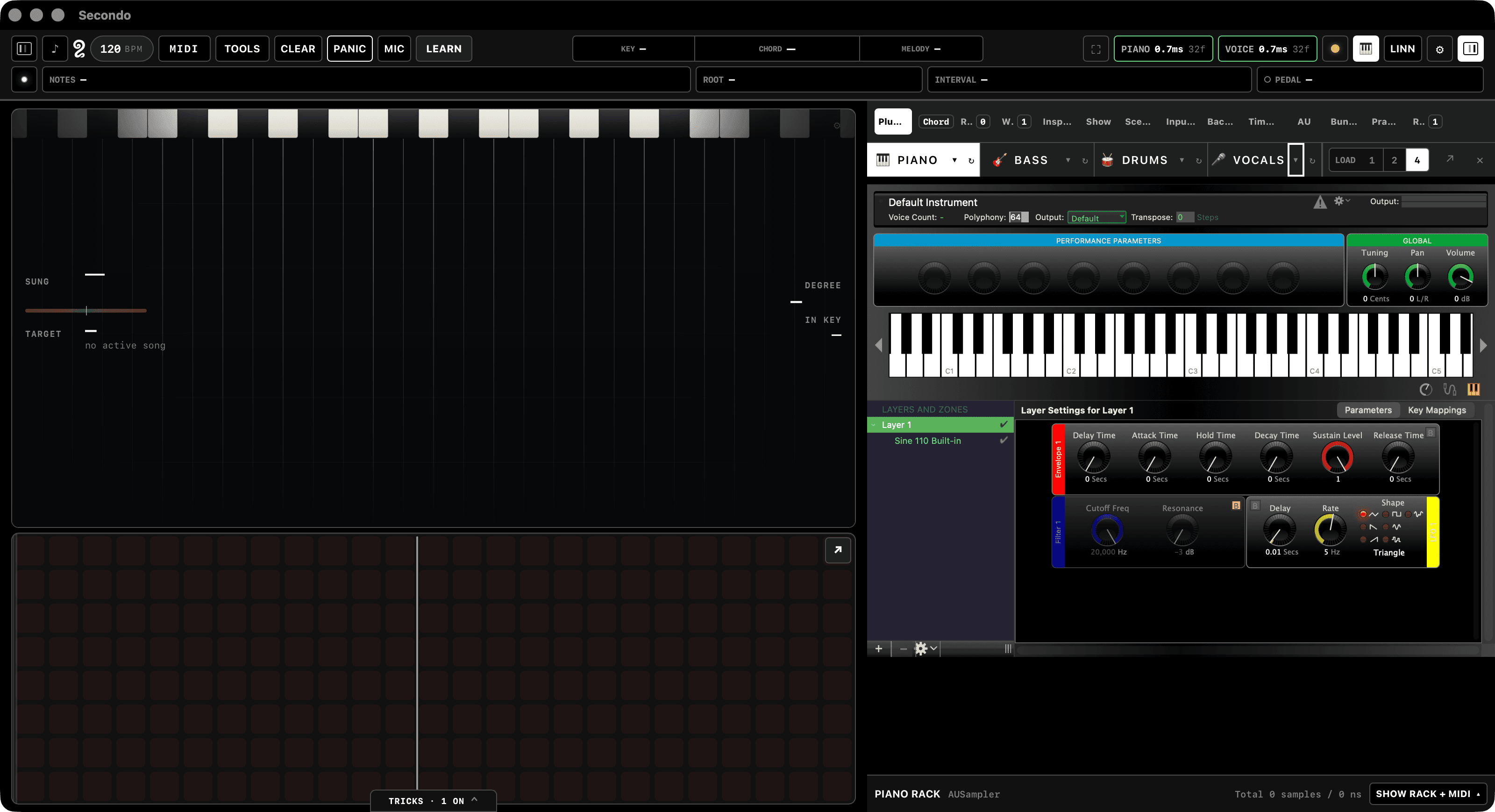
Your Audio Units, hosted
Secondo loads the instruments and effects you already own and opens their real editors inside the app. It ships no sounds of its own and does no processing of its own — the signal path is your plugins.
A rack per role, plus a master
Chain effects on any role, bypass a slot without unloading it, and put a mastering rack across the whole output.
One mixer for the band
Channel strips for every role with pan, gain, mute, solo and live meters. It reads like a mixer because at 9pm you need it to.
Patches you can recall by name
Capture an instrument's entire state as a named snapshot and pull it back on any song.
Route anything to anything.
Not a fixed signal chain — a graph you draw. Routes are additive by default; mark one as a replacement and it mutes the default path it stands in for. Feedback loops are rejected before a route is ever saved, and you can dry-run an event through the graph before you commit it.
Built around the way a set actually runs.
Setlists that bring the rig with them
Advance a song and Secondo restores the trick settings, the plugins and their presets, the tempo, the key, and the gains — in one move. Play the set through, fix what's wrong, hit Capture, and the song remembers.
A readiness check before you walk on
One surface that answers the only question that matters at 8:59: is this rig actually ready to play this show.
Windows for the rig you actually have
Stage HUD, lyrics, foot view, and a full-screen performance grid — each its own window, for the second screen and the monitor by the drummer.
Feet and pads
Any MIDI pedal becomes a controller, and a mapped pedal is intercepted before the note pipeline, so a pedal press can never accidentally play a note.
One button that stops everything
Panic kills every hanging note, everywhere, immediately. You will use it. That's why it's on the top bar and not in a menu.
Play a LinnStrument? Everything here still holds.
Secondo was built on one, and the grid it draws is still the richest surface in the app. It is now the second option rather than the only one — a toggle, not a removal.
The grid is intact
Nothing about the LinnStrument surface was deleted or watered down to make room for the keyboard. Switch the instrument view in Settings → Visuals and you get the grid you have today, whole.
Secondo paints your LEDs
The app composites the layers onto the hardware itself — held notes, the next chord in the chart previewed ahead, a dynamics meter on the side column, and a vocal-range strip along the top row.
The split follows the note you played
Hand Split can cut the surface by pitch or by hardware zone, and the side is decided from the note you actually touched, so a transpose can never throw a note across the split.
Between the keys and the sound.
Plug in
Connect your controller and your audio interface. Secondo takes the MIDI in and puts the sound out — it sits in the middle of the path, not off to one side of it.
Build the rig
Load an Audio Unit into each role, draw the routes, set the splits and the tricks, then capture the song exactly as it stands.
Play the set
Arm the setlist. Every song brings its own rig with it — plugins, presets, tempo, key and gains — and there is a panic button when it all goes sideways.
Built for the stage, not the studio.
Most MIDI tools are built for someone sitting at a desk with time to think. Secondo is built for the moment the count-in ends.
Native macOS
A real Mac app that hosts your Audio Units directly. No plugin-chain gymnastics, no browser pretending to be an instrument.
Rust engine
Routing, hosting and performance state live in Rust. The metronome is synthesised on the audio render thread without an allocation, a lock, or a syscall — because that thread is the one that must never stall.
Setlists first
Songs, presets and macros organised the way a gig runs, not the way a project file does.
It earns its place on a real gig
It grew out of a working live rig. Every feature on this page survived a set.
- A Mac, and an audio interface you like.
- A MIDI keyboard, or any other MIDI controller. The engine — the tricks, the routing, the setlists — and the live keyboard on screen work with any of them. A LinnStrument gets its grid and its LEDs on top.
- Your own Audio Units. Secondo hosts the instruments and effects you already own; it ships no sounds of its own and does no processing of its own.
Where things stand, plainly: Secondo is not released yet — there is no download on this page, only a notify form. The live keyboard shown above is the current build's performance surface and every frame here is a real capture of it, not a mockup; it has not been through a public release because nothing has. The LinnStrument grid has been in the app for far longer. Everything else described on this page works whatever you plug in.
Secondo isn't finished.
It's the rig I play on, and it isn't ready for anyone else's yet. Leave an email and you'll hear once — when it is.